Weather BUB
- 4.9
- Rating
- 100.00K
- Installs
- Free
- Price

 Analysis by App-foxy
Weather apps usually ask me to think about rain, wind, and temperature before I have even decided whether I want to check the forecast. Weather BUB takes the opposite approach. Its central appeal is the way it turns a routine weather check into a small, cheerful moment, and that changes how often I feel inclined to open it. Developed by Weather Creative Inc., this free weather app is aimed at people who want practical information presented with personality rather than a serious-looking wall of numbers.
I spent time using it as a quick daily reference instead of treating it like a full planning tool. That distinction matters. The app is at its best when I want an immediate sense of what the day feels like and a pleasant visual experience while getting it. It is less convincing for users who need a highly technical forecast, extensive meteorological detail, or a replacement for specialist weather services. The real strength here is not simply showing weather; it is making the act of checking weather feel easy enough to become a habit.
Why the app’s cheerful presentation matters
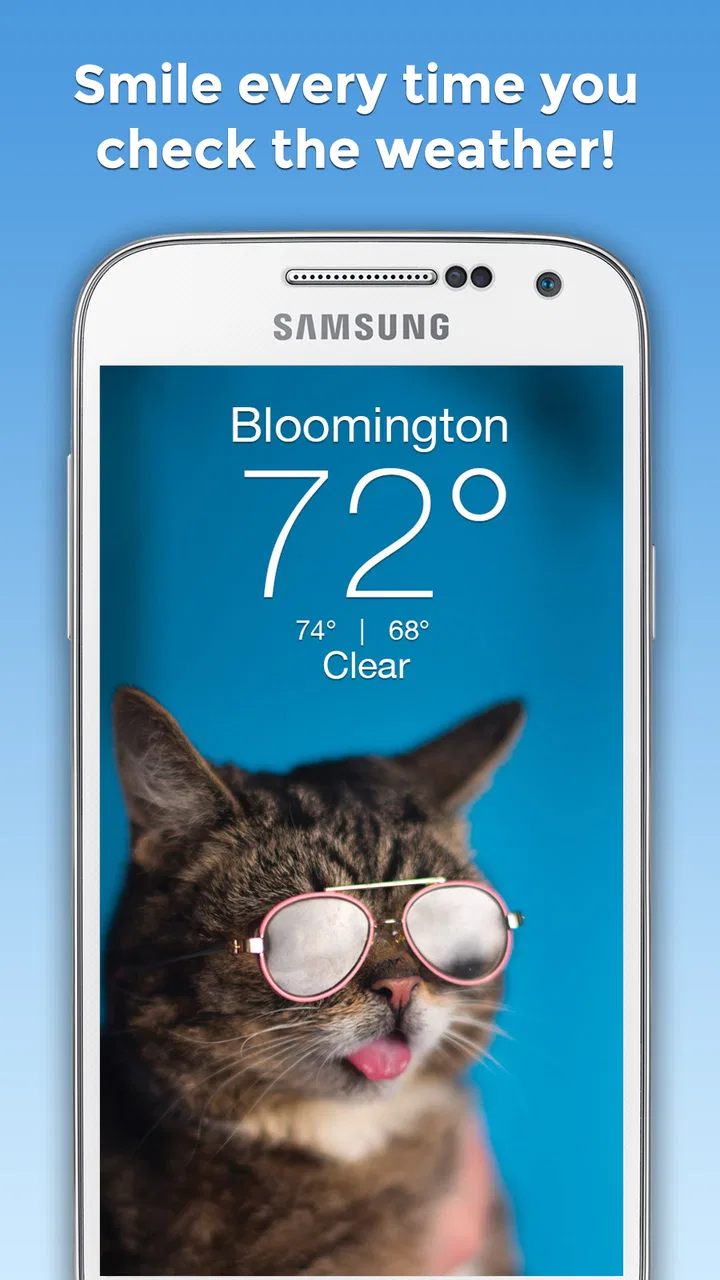
The most distinctive capability is its friendly presentation of weather conditions. Many alternatives communicate through dense cards, radar layers, warning banners, and rows of hourly values. Those tools can be useful, but they also make a simple question—“What should I expect outside?”—feel like a small research task. Weather BUB approaches that question with a lighter visual identity, matching the app’s promise of making each check more enjoyable.
You May Also Like

 Blood Strike: 2.5 Anniversary
Blood Strike’s Loadouts Turn Every Drop Into a Tactical Gamble
A close look at Blood Strike’s custom loadouts: how fast access to signature weapons reshapes its battle royale rhythm, rewards preparation, and narrows the gap between fights.

 Pandora - Music & Podcasts
Pandora’s Music Is Easy to Start, but Harder to Recover
Pandora’s strength is its low-effort path from a seed to a station. Its weak spot is how much confidence it asks you to place in connection, setup, and quiet recovery.

 8 Ball Pool
 Is Built on Rivalries, Rematches, and Routine
A close look at the rivalries, rematches, shared routines, and unanswered safety questions that turn a quick pool match into a persistent mobile community.

 Samsung Music
’s Quiet Strength Is Playing What You Already Own
Its reach comes less from spectacle than from dependable access to a personal library. That simplicity is both the app’s strongest retention engine and its ceiling.

 AccuWeather: Weather Radar
AccuWeather Review: A Quick, Clear Forecast for Everyday Decisions
For everyday plans, the best forecast is the one you can understand quickly. AccuWeather makes rain timing, radar, and local conditions easy to act on, with a few trade-offs.

 Hill Climb Racing
Why Hill Climb Racing Still Turns Crashes Into One More Run
A tiny car, a bumpy hill and one more upgrade: Hill Climb Racing keeps resurfacing because its simple chaos makes every near-miss feel personal.
More From Our News Desk



That sounds like a cosmetic difference, but I found it has a practical effect. When an app is quick to understand and pleasant to open, I am more likely to check before leaving home, before choosing clothes, or before deciding whether an outdoor plan is sensible. The benefit is not that the forecast becomes more accurate because it looks cute. The benefit is that the information is less intimidating and therefore more likely to be consulted at the right moment.
This is especially useful for people who do not want to interpret meteorological charts. A conventional weather app may offer more layers than most casual users need. Weather BUB is better suited to the person who wants a clear daily impression without feeling that they need to learn the interface first. I can imagine recommending it to a family member who regularly forgets to check the weather because other apps feel cluttered or overly technical.
The visual approach also gives the app a recognizable personality. That helps it stand apart from the default weather utility already installed on a phone. The standard option is often perfectly adequate for a quick temperature glance, but it can feel interchangeable with every other forecast tool. Here, the presentation itself is part of the reason to return.
Turning a quick check into a useful routine
I think the best way to use this app is to attach it to existing routines. Checking it while making coffee, before walking to work, or just before leaving for school makes more sense than opening it repeatedly throughout the day without a specific question. The app’s approachable style supports that kind of habit because it does not make the check feel like a chore.
A useful workflow is to look once in the morning for the broad shape of the day, then check again before an activity that depends on outdoor conditions. The first glance helps with clothing and travel decisions. The second is more focused: do I need an umbrella, should I move a walk earlier, or is a light jacket enough? This keeps the app in its strongest role—quick, everyday guidance—rather than forcing it to serve as a professional forecasting dashboard.
There is also a psychological advantage to a friendly interface when weather is disappointing. A gray, rainy forecast is still inconvenient, but an app that presents it with some warmth feels less punishing than a stark screen dominated by warning colors and severe-looking symbols. That will not change the weather, of course, but it can make the daily interaction less frustrating.
What I would check before relying on it
New users may reasonably wonder whether a cheerful design means the information is shallow. I would not make that assumption, but I would decide what level of detail I actually need before choosing it as my primary weather tool. For ordinary decisions, the app’s straightforward approach is appealing. For hiking, boating, long-distance travel, or weather-sensitive work, I would still compare its information with a more specialized source before committing to a plan.
That is not a criticism unique to this app. Weather conditions can change quickly, and no attractive interface removes the need for judgment. The important point is to understand the role Weather BUB plays in a phone setup. It works well as the first place I look, while a detailed forecast service may be the better second opinion when the consequences of being wrong are higher.
The app is free to install, which makes trying that workflow low-risk. It is marked for Teen users, and the current version is 6.2.7. Compatibility begins with Android 7.0, so people using older devices should check their system before expecting to install it. Those details make it accessible to a broad range of Android users, although the age rating is worth remembering for families deciding which apps are appropriate on a shared device.
A realistic day with Weather BUB
Imagine a weekday morning when I have a short walk to a bus stop, a lunch break that might include sitting outside, and an evening plan that could be cancelled by rain. I do not need a meteorological briefing. I need a fast answer about whether the day looks comfortable, unsettled, or likely to interfere with those plans. This is where the app’s main capability earns its place.
I can make the first check while getting ready rather than opening a browser and sorting through a page of information. If the conditions look mild, I can dress normally and move on. If the forecast suggests a wet or colder day, I can change my plans before I am already out the door. Later, a second check helps me decide whether the evening activity needs a backup option.
The non-obvious value is the reduction in decision friction. A forecast app does not need to provide more information than I can use in a minute. It needs to help me notice the information that affects my next decision. Weather BUB’s personality supports that by making the check feel inviting instead of administrative.
For parents, the same pattern can be useful when organizing a school run or an afternoon at a park. For students, it fits the quick check before commuting between classes. For remote workers, it can help decide whether a break outside is realistic. In each example, the app is not replacing careful planning; it is helping people remember to plan at all.
Where the friendly approach is most effective
The app is particularly well matched to casual users who check weather several times a week rather than obsessing over every hourly shift. It also suits people who respond better to visual cues than to technical descriptions. If a standard weather screen feels cold, crowded, or forgettable, this app has a better chance of becoming the one you actually open.
I also see value for users who want a personal touch on a device that otherwise feels utilitarian. A weather app is opened often enough to become part of the phone’s atmosphere. A more playful presentation can make that repeated interaction feel less mechanical. This is a small benefit, but repeated small benefits are exactly what make a utility worth keeping installed.
On the other hand, users who want radar interpretation, detailed storm tracking, agricultural information, or extensive historical comparisons should look toward a different category of weather service. The usual alternatives may be less charming, but they are often designed around depth rather than mood. Choosing between them depends on whether the weather check is mainly a daily convenience or a serious planning instrument.
The tradeoff between charm and depth
The central tradeoff is clear: Weather BUB prioritizes approachability, while more conventional weather apps often prioritize breadth. I appreciate the former because it removes visual resistance, but I would not pretend that a pleasant interface automatically satisfies every forecasting need. Someone who wants to compare multiple locations, inspect detailed trends, or study changing conditions may find a simpler experience limiting.
There is also a difference between information that is easy to notice and information that is easy to investigate. The app’s style is well suited to the first task. If I want to know whether today seems suitable for a walk, it helps. If I want to understand how a weather system is developing over several hours, I would prefer a tool built around deeper analysis.
Another practical consideration is the presence of in-app purchases ranging from $1.99 to $29.99 per item. Since the app itself is free, I can test the basic experience before deciding whether any optional purchase is worthwhile. I would encourage users to spend time with the free version first and judge whether the extra value matches their own routine. A paid addition makes more sense for someone who uses the app constantly than for a person who checks once every few days.
That pricing range also means expectations should be personal rather than automatic. I would not pay simply because the design is cute. I would only consider an in-app purchase if it improved a part of my daily workflow enough to justify the cost. This is a useful distinction with any free utility: the initial download is easy, but long-term value depends on whether the app solves a recurring problem.
How it compares with the usual alternatives
The default weather app on a phone usually wins for convenience because it is already present and familiar. It may also be the better choice when I need a dense overview without caring about presentation. Browser-based forecasts can be useful when I want to compare sources or search for a destination, while specialist services are stronger for severe conditions and technical planning.
Weather BUB competes on a different axis. It is not trying to make every possible weather detail visible at once. Instead, it gives the everyday check a more welcoming identity. For me, that makes it a better choice when the problem is not lack of information but lack of motivation to look at information in the first place.
The tradeoff becomes especially noticeable when I am traveling. For a normal day in a familiar place, the app’s quick, friendly approach is enough to guide basic decisions. Before a long journey, however, I would want a service that makes destination comparison and changing conditions easier to examine. Keeping both kinds of app can be sensible: Weather BUB for the routine glance and a more detailed alternative for higher-stakes planning.
Who will get the most from it
I think the strongest audience is people who want a simple weather habit with a bit more personality than the standard utility provides. That includes casual users, families, students, and anyone who tends to ignore weather apps until they are already outside. The app’s free entry point makes it easy to see whether its presentation encourages more regular checking.
It may also appeal to users who enjoy cohesive, expressive app design. Weather is a repetitive subject, so a distinctive tone can matter more here than it would in an app opened only once a month. If I am going to check the forecast every morning, I prefer an experience that feels pleasant and recognizable rather than purely functional.
People who should skip it are those who treat weather information as a technical tool first. Outdoor professionals, serious travelers, and users who need extensive warning or mapping features should choose an alternative designed around that priority. The same applies to anyone who dislikes decorative presentation and wants the most compact numerical display possible. In those cases, the charm may feel like an extra layer rather than a benefit.
The developer, Weather Creative Inc., has kept the concept focused enough that the app is easy to understand without a long learning period. I did not need to rethink how I check a forecast; I simply found the interaction more inviting. The app has an average rating of 4.9 from around 8.7 thousand ratings, with over 2.1 thousand written reviews and more than 100 thousand installs. Those figures suggest that its distinctive style resonates with a substantial group, although popularity should not replace matching the app to your own needs.
My practical recommendation before installing
Before making it your only weather source, decide what you normally ask a forecast to do. If the answer is “help me choose clothes, plan a walk, and avoid being surprised by rain,” this app is a strong candidate. If the answer involves detailed outdoor safety decisions or intensive comparison between locations, use it as a pleasant first glance rather than the final authority.
I would also pay attention to how often the app changes my behavior. After installing it, give it a few ordinary mornings and see whether you check the weather more consistently. That is the fairest test of its main advantage. The value is not just that the screen looks different; it is whether the presentation turns a neglected routine into a useful one.
For users concerned about optional spending, the free installation gives enough room to judge the basic fit before considering purchases. I would keep notifications and checking habits focused on actual needs rather than allowing any weather app to become background noise. A simple routine—morning glance, activity-based second check, specialist source for serious plans—gets the most from this kind of tool without demanding too much attention.
Weather BUB is ultimately a weather app for people who want information to feel approachable. Its most meaningful feature is the emotional change it brings to a mundane task: I am more willing to check, and that makes everyday planning a little smoother. It does not replace every detailed alternative, and users with technical forecasting needs should choose accordingly. For casual daily use, though, its free, friendly presentation makes it one of the more enjoyable ways to stay aware of what is happening outside.
FAQs for Weather BUB
01What is Weather BUB and what can I use it for?
Weather BUB is a weather application designed to provide quick access to current conditions and forecasts in a simple, friendly interface. After reviewing the app, its main purpose is to help users check temperature, precipitation, wind, and other useful details without navigating through complicated menus. It can be useful for planning commutes, outdoor activities, trips, or everyday routines.
02Does Weather BUB provide accurate and reliable weather forecasts?
Weather BUB is intended to make weather information easy to understand, but forecast accuracy depends on the weather data providers, your location, and how far ahead you are checking. Short-term forecasts are generally more dependable than long-range predictions. As with any weather app, users should treat severe-weather information seriously and confirm important warnings through official local meteorological services.
03Does Weather BUB require location access to work?
Weather BUB may request location permission so it can automatically display weather conditions for your current area. You can usually choose whether to allow access while using the app, deny it, or select a location manually, depending on the version and device. If privacy is a priority, review the permission request carefully and avoid granting background location access unless it is genuinely necessary.
04Is Weather BUB free to download, and are there advertisements or in-app purchases?
The availability of free features, advertising, and optional purchases can vary according to the platform, region, and app version. Before downloading, check the official Google Play Store or Apple App Store listing for the current pricing details. It is also worth reviewing the subscription screen carefully, because some weather apps offer additional visual features or remove advertisements through paid plans.
05What should I check before installing Weather BUB on my phone?
Before installing Weather BUB, check that your Android or iOS device meets the requirements shown on the official store page and that you have enough free storage. Also review the app’s recent update date, privacy information, requested permissions, and user feedback. If you rely on weather alerts, confirm that notifications are enabled and that the app supports your country and preferred locations.
Pros
- Clean
- colorful interface makes forecasts easy to scan.
- Provides quick access to current conditions and upcoming forecasts.
- Useful weather details help with everyday planning.
- Location-based forecasts reduce the need for manual searches.
- Lightweight design is suitable for quick checks on the go.
Cons
- Forecast accuracy can vary by location and changing conditions.
- Some features may require location access to work properly.
- Weather data may load slowly with a weak internet connection.
- The app may offer fewer advanced tools than dedicated weather apps.
- Notifications could become distracting if too frequently enabled.

Weather BUB
Gallery